
Configuring the server in the console
Once the server is set up, an admin changes its settings on the console's Settings page, under Server: the connections, sign-up and sessions, single sign-on and two-factor rules, mail, security switches, retention, workflow and alert options. Every variable is still described in Configuration; the page shows the same names.
The page is for admins signed in to the console. No API token can read or change settings (an environment admin token neither, even with JOOBQUI_ALLOW_ENV_TOKEN_ADMIN), and other roles see "Admins only". The page stays available when the licence has lapsed or the server was disconnected, so its connections can be fixed and it can be connected again.
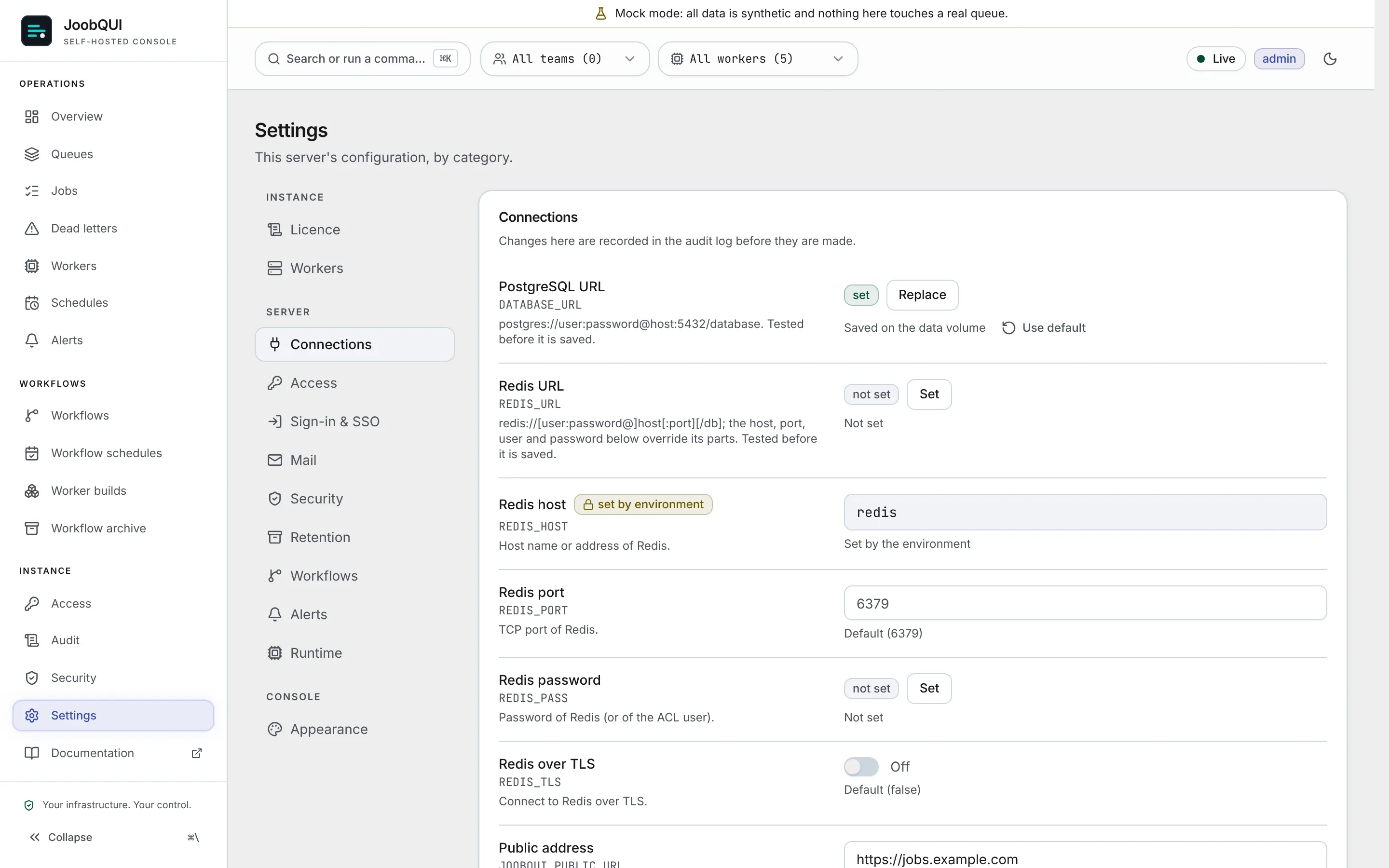
Where a value comes from
Each setting shows where its value comes from now, in this order:
- The environment of the process (a variable, or a
NAME_FILEsecret). Such a setting is shown as set by environment and cannot be changed in the console: change it where the server is started. This is how a deployment keeps a setting under its own control (in Compose, Kubernetes or a secret manager). - A saved value. The connections (PostgreSQL, Redis) and the public address are saved in the encrypted file on the data volume (
/data/joobqui.conf), next to what the setup page saved. Everything else is saved in PostgreSQL (thesettingstable), shared by every instance. - The default, shown as the placeholder.
Secrets (database and Redis URLs and passwords, the SMTP password, the single sign-on client secret, the SDK token) are never shown or sent back, only whether one is set. Replace enters a new one; Use default clears it. Saved secrets are sealed with the server's secrets key (JOOBQUI_SECRETS_KEY, generated at setup); if that key changes, the page lists the saved secrets it can no longer open, and they must be entered again.
The page lists only what the console manages. The listen address and port, CRYSTAL_ENV, LOG_LEVEL and paths on the server's disk (JOOBQUI_UI_DIR, JOOBQUI_WORKFLOW_ARCHIVE_DIR) belong to the process: set them in the environment.
Saving, live settings and restarts
Each group has its own Save. Nothing in a group is saved unless every value in it is valid: a value outside its rules is named under its field, and so is a change the server would refuse at its next start (single sign-on without its client id, a weak SDK token, more idle database connections than the pool, email verification without mail in production). Connections are tested before they are saved (Redis answers PING, PostgreSQL a query), so a typo cannot lock the server out of its own data. A new PostgreSQL URL is asked for again: another database has other accounts and settings, and an empty one has none. If a saved value would still stop a start (an environment changed meanwhile), the server leaves out as little as it can (a bad role map, not the whole provider), says which setting and what that means in its log, shows it in a red banner on this page ("saved but not applied"), and starts. Two cases fail closed: if email verification is left out while sign-up is open, sign-up is closed until the next start; if single sign-on is left out while "single sign-on only" is on, passwords keep working for everyone (otherwise nobody could sign in) and the banner says so.
A saved secret stays with its server. Changing where a password goes needs the password in the same change: Redis (host, port, user, URL, or turning TLS or the certificate check off) with its password, mail (host, port, user) with the SMTP password, single sign-on (issuer, client id) with the client secret. A secret set by the environment must be changed there.
Test Redis, Test PostgreSQL and Send a test message try the values in the form without saving them, give up after 5 seconds and answer in plain words (unreachable, timed out, authentication failed, TLS failed). The same rule applies: to test another server, type its password too. Ten tests a minute are allowed.
Settings marked live take effect within seconds on every web instance, without a restart: mail (SMTP), the client address header, the SDK gateway token and whether environment admin tokens may manage access. They are read for every message or request.
Every other setting is applied when the server starts. After saving one, a Restart to apply banner lists what waits for a restart. Restart restarts the instance that answers: it stops taking requests, lets the ones in flight finish, stops the workflow workers and queues the usual way (running jobs are handed back), and starts again with the saved settings. The console reconnects on its own after a few seconds. With several instances, each one shows the banner until it has restarted: restart them one at a time (or roll the deployment).
The public address cannot change while the server is connected, because the licence is issued for it: disconnect on the Licence card first, change the address, restart, and connect again.
Every change is in the audit log by setting name, never by value (settings.update, settings.test, settings.restart). Changes in every group but Workflows and Runtime are critical: the audit row is written first, and the change is refused if it cannot be. The audit log keeps at least 30 days when its retention is set here.
The Licence card
The Licence card shows the organization and deployment the server is connected to, its tier and status, its last successful check-in, and whether its check-ins are signed with its installation key. It never shows the licence key.
- Reconnect shows a short code and a link to app.joobq.io, as the setup page does. An admin of the organization approves it there (every instance shows the code and how it is going); the server saves its new licence on the data volume and restarts by itself to use it (the portal replaced its credentials, so the old ones stop working). Other instances sharing the volume show "restart to apply" for the licence: restart them too. People signed in with JoobQ sign in again after the restart (their sign-in was made with the old credentials); local accounts stay signed in. Reconnect from the instance you started it on: the code is shown there.
- Disconnect (with a confirmation) disables the server on the portal and removes its licence, exactly like
./joobqui disconnect --yes. The console then stops being licensed; Connect gets a new licence, and a restart without one opens the setup page. If the portal no longer knows the server's credentials, the card offers Remove the licence anyway (the--forceof the command line).
Both are critical audit events (licence.disconnect, licence.reconnect). See Licence and Pro key.