
Manage licences and servers
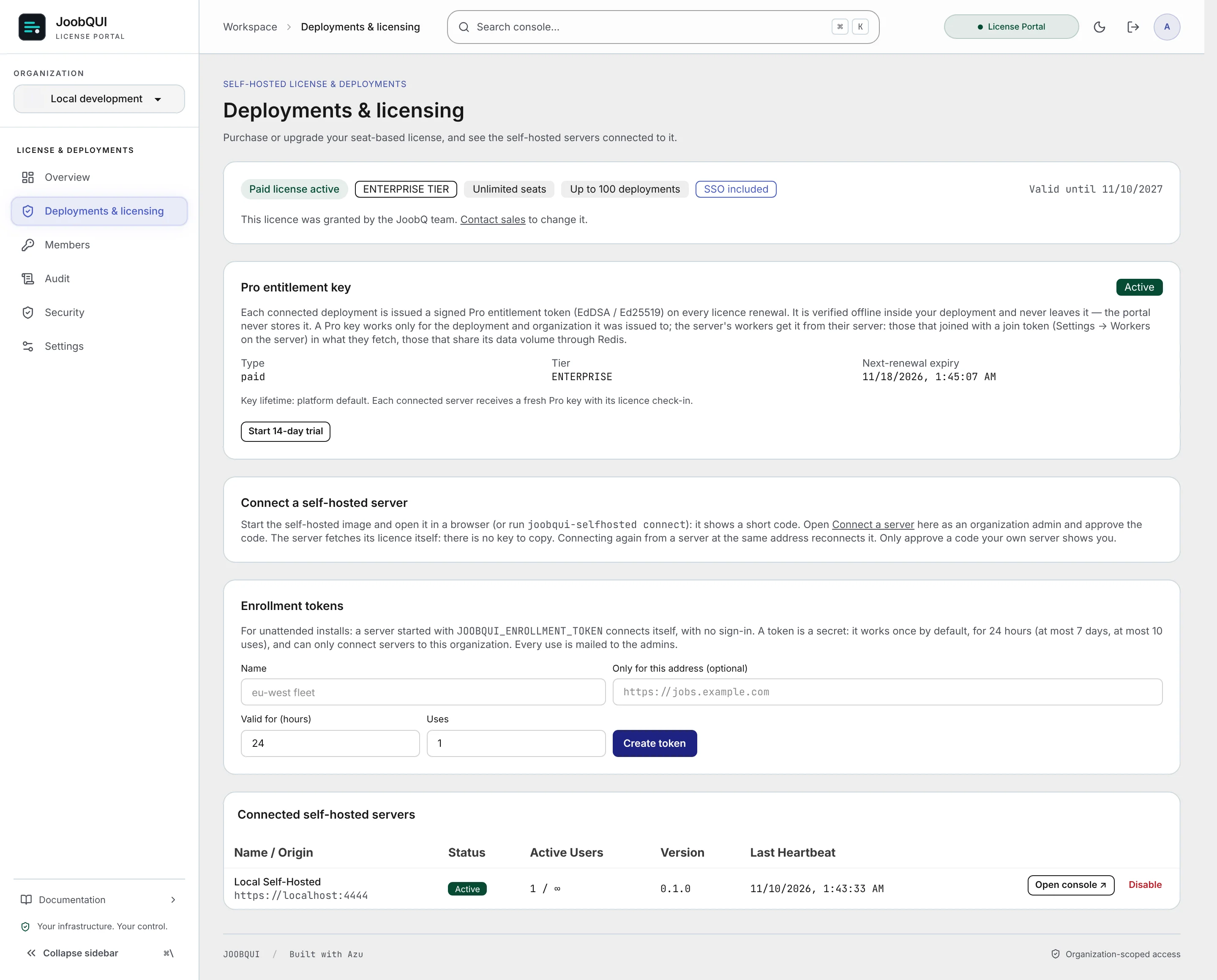
Everything here is on the portal's Deployments & licensing page. Every member can read it; buying, connecting, enrollment tokens and disabling need an organization admin.
Buy a licence
| Tier | Seats | Server slots | Instances of one server | Single sign-on |
|---|---|---|---|---|
| Pro | Unlimited | 1 | 2 | No |
| Enterprise | Unlimited | 10 | Any | Yes |
- A seat is an active account on a server's console.
- A server slot is one registered server. Disabled servers do not count.
- Instances are running copies of one server that share its data volume: replicas, or the old and the new during a deploy. They take one slot together.
Choose a tier and purchase it. Pro is $149 a month or $1,490 a year, and Enterprise is quoted on request. Pro is paid through a Stripe-hosted checkout; Enterprise is sold by contact (Contact sales) unless the page offers it. More deployments are available, a staging server included: Pro adds as many additional deployments as you need for $75 a month or $750 a year each, set up by the JoobQ team on request. Enterprise includes 100 deployments, and beyond that a custom quote. The page shows Paid license active once the payment is confirmed.
Change or cancel
Upgrade or change plan opens Stripe's billing portal, where you switch plans, update the card or cancel. A cancelled licence runs to the end of the period already paid.
| Event | Effect |
|---|---|
| A period ends and the renewal is not charged yet | Nothing: a paid period runs 24 hours past its end, because Stripe charges a renewal about an hour after the period starts |
| A renewal fails | The licence stays active for 7 days from the start of the unpaid period, then lapses |
| A refund or a dispute | The licence ends at once |
| A change to a plan with fewer server slots | The oldest servers keep the slots. The newer ones stop being renewed: their consoles answer 402 after the next check-in, until you disable a server or move to a larger plan |
| The licence lapses | Each server's console answers 402 paid_license_required after its next check-in. Workers keep running. The Pro key is no longer renewed: Pro features follow When a key expires |
| It is paid again | Servers recover at their next check-in, within 15 minutes, or at once with ./joobqui license:refresh |
A failed renewal, step by step:
| When | What happens |
|---|---|
| Day 0 | The renewal fails. Nothing changes: the licence stays active and the Pro key keeps being renewed |
| Day 7 | The licence lapses. At its next check-in each server's console answers 402 paid_license_required. Workers keep running. The server keeps its last Pro key, which is no longer renewed |
| The key's expiry | Nothing changes yet: a paid key is honoured for 7 more days, with a warning in the log at each start |
| 7 days after the key's expiry | The key has lapsed: work already accepted finishes, new Pro work answers 402 pro_required |
| Any time | You pay: servers recover at their next check-in |
A server that cannot reach the portal follows the same last three rows (When a key expires).
Invoices and tax IDs
Stripe handles invoices. It emails the invoice or receipt for every payment to the billing contact of the subscription. Checkout asks for a billing address and lets you enter a tax ID, and Stripe Tax adds the tax that applies. To change the address or the tax ID for future invoices, open Upgrade or change plan, which opens Stripe's billing portal. If the portal does not offer what you need, write to support@joobq.io.
Read the server list
Connected self-hosted servers has one row per registered server:
| Column or badge | Means |
|---|---|
| Name / Origin | The name the server proposed and its public address. An address is unique in the organization |
| Last Heartbeat | Its last check-in. More than 15 minutes ago means the server is down, or cannot reach the portal |
| Active Users | The number of accounts it reported, counted against the seats |
| Version | The software version it runs |
| Signed | Its check-ins are signed with the server's own key |
| Flagged | More instances than the tier expects, or instances on more than one network, checked in within the last hour |
A flag refuses nothing: it tells you, on the page and by a daily mail to the admins, that the licence is used more widely than expected. Replicas and blue/green deploys explain most flags. A copy of the server's data volume running somewhere you do not know explains the rest: see replace a server.
Connect a server
See Register a server. Registering needs an active licence and a free slot; without one the server is refused with 409 deployment_limit_reached.
Ask for an extra deployment
A Pro licence includes one server. Each extra one costs $75 a month, or $750 a year on a yearly plan, and is added to your subscription by hand: nothing about it is self-serve.
- Write to support@joobq.io from the address of an organization administrator. Give the organization name and how many extra deployments you want.
- We add them and confirm by mail. The charge is part of your Pro subscription, so the usual cancellation and renewal rules apply to it.
- Connect the additional server as usual (Register a server). Until we confirm, it is refused with
409 deployment_limit_reached.
Move a server to a new address
The licence is issued for the server's public address, so the address cannot change while the server is connected:
- On the server's Licence card, choose Disconnect. The portal disables the server and frees its slot.
- In Settings, Connections, change the public address and restart the server.
- Connect it again (Register a server). The new address is registered with the same licence.
To keep the same address on new hardware, use Replace a server instead.
Replace a server
To move a server to new hardware, or to cut off a copy of its data volume:
- Start the new server at the same public address and connect it (Register a server).
- On the portal the button reads Approve and reconnect. Approve it.
- Once the new server has collected its licence, the old one's credentials stop working. It keeps its slot: no second slot is used.
Disable a server
Disable on the server's row:
- the portal stops renewing its licence, and its Pro key;
- after its next check-in, the server's console and API answer
402 paid_license_required; - its slot is free again;
- its workers keep running.
To bring it back, connect it again. From the server itself, ./joobqui disconnect --yes (or Disconnect on its Licence card) does the same and removes the licence from the server.
Enrollment tokens
An enrollment token lets a server register itself without anyone approving a code: for pipelines and orchestrators.
- Under Enrollment tokens, choose Create token.
- Give it a name and, optionally, the one address it may connect.
- Choose how long it lasts (1 to 168 hours, 24 by default) and how many servers it may connect (1 to 10, 1 by default).
- Copy the token (
jq_enroll_...). It is shown once.
The list shows each token's first characters, its uses and its expiry. Revoke stops a token that was not used.
A token registers servers in your name
Anyone holding it can connect a server to your organization until it expires or is used up. Limit it to one address, keep it short-lived, and pass it to the server as a secret. It signs nobody in.
How the server uses it: Unattended install.
What is recorded
Every action on this page is in the organization's Audit page, and every connection is mailed to all admins.
| Action | Recorded as |
|---|---|
| An admin approves a code | license.device.approve |
| A server collects its licence | license.deployment.connect, or license.deployment.reconnect |
| A token is created | license.enrollment_token.create |
| A server is disabled | license.deployment.disable |
| A trial Pro key is issued | pro.key.trial |